Install one program. Keep your cameras.

CamRA runs on a Windows PC at your site and works with the IP cameras already on your walls. No coding: add your cameras and test each one. Turn reports on for a camera, and its first report arrives within minutes of its first recording.

  1. Installed on a Windows PCRuns as a Windows service. Starts with the PC.
  2. Cameras found on your networkWhat it finds appears under Discovered Cameras in a few seconds.
  3. Connection testedConnected
  4. First recordingDispatch Bay at 7:33 AM in the CamRA player: three people in hooded coveralls unload a white van, each in the box CamRA drew.Dispatch Bay · 7:33:28 AM
  5. 7:33:28 → 7:37:103 min 42 sfrom recording to alert
  6. First reportHigh 7/107:37:06 AM
Times from a site we run on public footage.

Your cameras, a PC, the internet. Nothing else to buy.

You need

  • IP cameras with a video stream (RTSP): an address, a user name and a password for each. Fixed, PTZ and 360 fisheye cameras all work.
  • A 64-bit Windows PC or server at your site that can reach the cameras. It runs on the processor, and also uses the PC's Intel or NVIDIA graphics when it has them. No separate graphics card is needed. Big sites add more PCs. CamRA shares the cameras between them and tells you when a site needs another.
  • An internet connection.

You don't need

  • New cameras.
  • Coding. Everything is set up in CamRA, in your browser: forms, switches and rules in your own words.
  • A plan or a per-camera fee. You pay for what you use. See pricing

Our own building runs on it: 66 cameras, 43 fixed and 23 fisheye.

Connect. The cameras you already own.

  1. Add the PC in CamRA. You get a device ID and a key for it.
  2. Run the installer on that PC. CamRA's signed Windows installer asks for the license, a folder, the ID and key, and where to keep recordings. It runs as a Windows service: it starts with the PC, and Windows restarts it if it ever stops.LicenseFolderDevice ID and keyRecordings folderInstall
  3. Let it find your cameras. The PC looks for cameras on your network. You adopt the ones you want.
  4. Or add one by its address. Name, address, user name and password, then Test connection: you see a picture from the camera before you save it. If something is wrong, it says what, in plain words: “The camera refused the user name or password.”

From then on, every camera is live in your browser, in the Windows Desktop Viewer and in the CamRA app (in testing). Live view & 360

Test connection

Name · Address · User name · Password

Connected

A picture from the camera, with its size, frame rate and codec, before you save it.

Nothing is saved by a test.

Choose. What it records, and what it watches for.

Every camera has the same few choices, and each has a default, so you can skip any of them.

Recording
OffMotion (the default)Continuous
Detection
On (the default)On, with plate reading
AI reports
Off (the default)When a rule matchesEvery recording
Keep recordings
90 days (the default)180 days1 yearYour own numberForever
Zones and masks
Drawn on the camera's picture. Masks are covered on the PC, before anything leaves.
360 cameras
It finds the lens circle. You pick how it is mounted: ceiling, wall or floor.
Edit Camera in CamRA with the Recording mode list open: Off, Motion and Continuous.

Then tell it what to watch for: which cameras, which hours, who hears about it, and what to look for, in your own words.

Delivery van at Dispatch Bay: on Dispatch Bay, 6:00 AM - 6:00 PM (America/New_York), alert when a delivery vehicle is being unloaded.

On a site we run on public footage.

Writing an alert rule in CamRA: the condition, a delivery vehicle is being unloaded, is typed into the rule.Writing an alert rule in CamRA: the condition, a delivery vehicle is being unloaded, is typed into the rule.

Invite the people who should see it, each with a role: Admin, Manager, Operator, Viewer or Guard, or one you make, down to a single camera.

Inviting a person in CamRA: an email address and the Role list with Admin, Manager, Operator, Viewer and Guard.

A dock that should be empty at night, a gate that should log every car, an entrance that should be quiet after seven: each is one of these choices. Your first week

It works. The report is waiting within minutes.

Once reports are on for a camera, CamRA writes what happened in a short report, scored from 0 to 10, within minutes. You open only the ones that matter.

Garage Exit 2: a person walks up the ramp away from the camera inside the person box CamRA drew.
Medium 5/10

Person running through Garage Exit 2

A single person was detected running through Garage Exit 2 over a ~17 second clip (15 detection frames). Movement was continuous and fast; no other objects (vehicles, groups, or weapons) or signs of forced entry were detected. Recommend reviewing adjacent cameras and access logs for identification and context.

Garage Exit 2 · Sep 24, 2:44 PMOur own building
When a recording matches one of your rules, its people get an alert with CamRA's reason: in the app, by email and on iPhone (the CamRA app is in testing). See the minutes

Ask in plain words, and it answers with the clip. AI Chat

Within minutes. Here are the minutes.

3 min 42 sfrom the recording starting to the alert rule matching

  1. 7:33:28 AM · Recorded

    Dispatch Bay at 7:33 AM in the CamRA player: three people in hooded coveralls unload a white van, each in the box CamRA drew.

    Dispatch Bay records a white van being unloaded.

  2. 7:37:06 AM · Report

    High 7/10

    Report written

  3. 7:37:10 AM · Rule matched

    Delivery van at Dispatch Bay

    “Those elements (delivery vehicle, persons handling boxes, open van door) are consistent with a delivery/unloading event.”

  4. 7:37 AM · Alert

    Event alert: Delivery van at Dispatch Bay

    To the rule's 3 recipients as each one chose: in the app, by email and on iPhone (the CamRA app is in testing).

Timed on a site we run on public footage, not a customer site; what CamRA wrote there is real.

How long setup takes depends on how many cameras you have. Once reports are on for a camera, its report and its alert come within minutes.

Watched on your PC. Kept and written up in the cloud.

On your PC

  • Records every camera.
  • Finds people, vehicles and animals in each recording, and follows them from frame to frame.
  • Writes a short caption of each scene.
  • Covers your privacy masks in the video before anything leaves.
  • Recordings and stills to your organization's storage
  • Text only to the AI that writes reports
  • With plate reading on: up to six pictures of each vehicle to the plate reader

In CamRA's cloud

  • Keeps your recordings in a storage account dedicated to your organization, in CamRA's Azure subscription.
  • Writes the reports, checks your rules and answers your questions, from text.
  • Lets you search, watch and share from anywhere you sign in.

Sign in with Microsoft, Google, Apple or email, and add an authenticator as a second step if you want one. Privacy and trust

The internet drops. The cameras keep recording.

  • The internet drops. Recordings wait on the PC and upload when the connection is back. If the oldest has waited more than an hour, you get an alert.

    Upload Backlog Cleared · Resolved
  • A camera's main stream fails. It records the camera's second, lower-resolution stream instead.

  • A camera goes quiet. You hear about it after 5 minutes.

  • A lens gets dirty. It flags the lens, and clears the flag once the picture is clean.

    Dispatch · Dirty lens detected → resolved · Nov 10
  • The program or the PC stops. If the program stops, Windows restarts it. If a whole PC goes offline and you run more than one, its cameras move to another after 5 minutes.

  • The disk fills up. You get a warning when the recordings disk passes 90 percent.

Your first week. Where to start.

A rule for the dock at night.

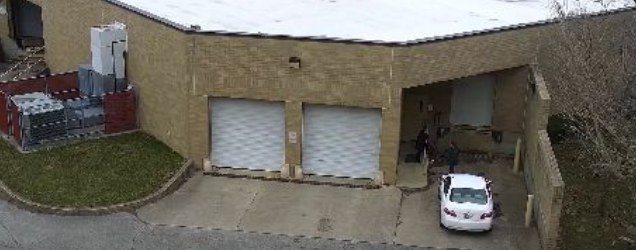
Loading dock after hours: on Loading Dock 1, 10:00 PM - 6:00 AM (America/New_York), alert when a vehicle stopped at the dock door.

Loading Dock 1 from above at 11:28 PM: a white car stopped at the dock door beside two closed bay doors.

It matched two recordings, at 11:28 and 11:29 PM.

On a site we run on public footage.

Logistics

Plate reading on the gate cameras.

Garage Entrance 2: a black Chevrolet Camaro drives in, with the car box CamRA drew and plate box on it; the plate is blurred.

Black Chevrolet Camaro · Garage Entrance 2 · Oct 12, 8:00:39 AM · 8 sightings, in and out, on 4 days of one week.

At our own building's garage.

Parking

Your days and hours, set once.

Weekday evenings, plus all weekend.

Pick the days for each rule, then all day or up to eight time ranges. Times follow the site's clock.

Offices

Your cameras are already up. Let's connect the first one.

Book a call. We'll walk through your cameras and your PC, and show you real reports from our own building.