Your lobby, over a week. See where people go.

Pick a camera and a date range, and CamRA's heatmap shows where people walked over those days. After hours, CamRA watches the doors, and the right people hear within minutes when one of your rules matches.

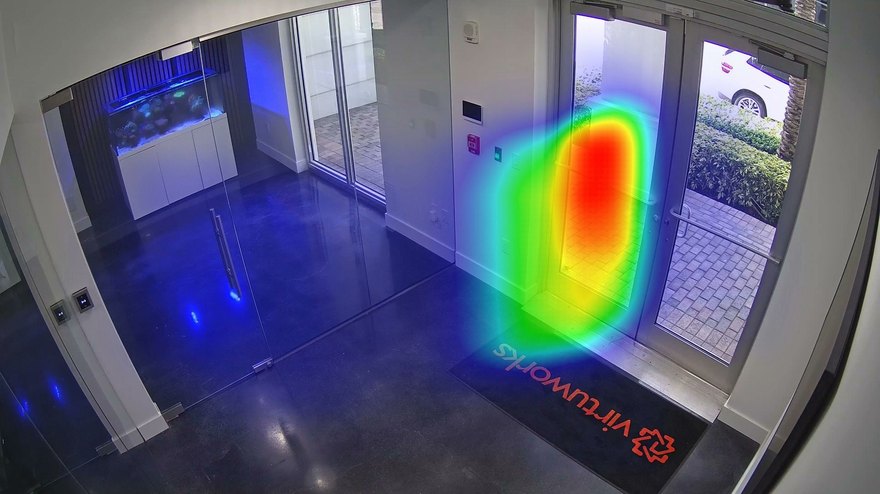
CamRA's heatmap of people in an office lobby, Front Lobby, Sep 27 – Oct 3: the hot spot is at the entrance door

the entrance door

Front LobbySep 27 – Oct 3Person

Name your hours once. It checks every night.

Set the rule up the way you would brief a colleague: on Reception, from 7 PM to 7 AM, alert when a person is at the entrance or reception area. Pick the cameras and the people to tell; this one tells four. From then on, CamRA checks every new recording from that camera against the rule. When it matches, the alert reaches them within minutes, with CamRA's reason: in the app, by email and on iPhone (the CamRA app is in testing).

How a rule is set up

Person at the entrance after hoursAlert rule

On Reception, from 7:00 PM to 7:00 AM, alert when

a person is at the entrance or reception area

Tell 4 people.

Event alert rules in CamRA: Weekend access and Person at the entrance after hours
The office's rules in CamRA's rule list.

Every evening, scored. Alerts only when one matches.

With AI reports on for every recording, each one gets a title and a score from 0 to 10, nights included. On one Tuesday on a logistics site's office floors, Corridor 2F recorded people at 9:40 PM and 9:43 PM. Both scored Low 2, routine. The Weekend access rule checked both, worked out that it was a Tuesday, and sent nothing.

Corridor 2FTuesday, Oct 6

  1. 9:40 PMRoutine pedestrian traffic in Corridor 2FLow 2No match
  2. 9:43 PMMultiple pedestrians moving through Corridor 2F — routine activityLow 2No match

Weekend accessAlert rule

Corridor 2F · all day · tells 4 people

Alert when

the recording time falls on a Saturday or Sunday, New York time

CamRA's check, word for word

“…which is a Tuesday — not a Saturday or Sunday. Therefore the incident does not match the alert rule.”
Every recording, watched for you

Hand someone the clip. Not a login.

Open the recording, press Share, choose how long the link lives: 24 hours, 7, 14 or 30 days. Send it to your landlord, an insurer or the police. They open it in a browser with no account, and it switches itself off when the time is up. You can see every link you have sent and switch one off early.

  1. You press Share

    Share Recording in CamRA with the link set to last 24 hours

    Duration24 hours7 days14 days30 days

  2. They open it, no account

    A shared recording opened in a browser, no account needed

Front doors2 cameras

  • Front Door 14K @ 27fps · Motion · 90 days
  • Front Door 1 & 24K @ 27fps · Motion · 90 days

Lobbies2 cameras

  • Front LobbyInside the front doors
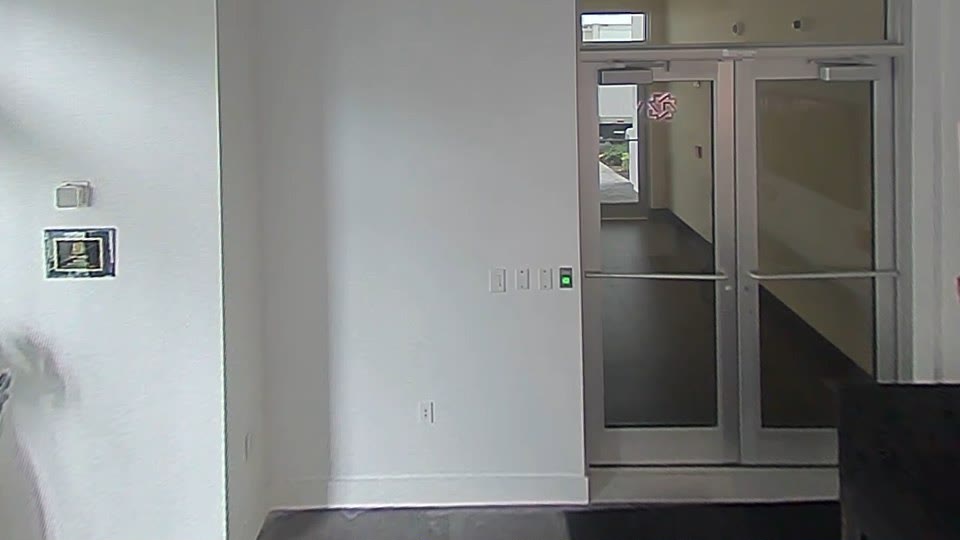
  • LobbyA fisheye camera at the door
A frame from the Lobby camera, a fisheye: the vestibule door
Lobby

Rooms5 cameras

  • Conference Room4K @ 25fps · Motion · 90 days
  • Customer Lounge3008p @ 16fps · Motion · 90 days
  • Copier Area1280p @ 20fps · Motion · 90 days
  • Office 2Lens: blur flagged
  • Office 4Lens: blur flagged

Doors, lobbies, floors. No new cameras.

This is our own building in CamRA: two cameras at the front doors, two in the lobbies, one of them a fisheye, and five in the rooms. Each keeps 90 days of footage. CamRA checks every lens too, and it flagged Office 2 and Office 4 for blur.

It even watches the cameras

Questions, answered.

  • Yes. Pick the days and hours in the rule's schedule, on the site's own clock. Here, a Weekend access rule written in words checked two Tuesday-evening recordings, worked out the local day and did not alert.

  • The people you add to the rule, within minutes. Each one gets it in the CamRA web app with CamRA's reason, and by email and on iPhone (the CamRA app is in testing), as you choose for each person. There is no SMS.

  • Send a share link. It opens the recording in a browser with no account, expires after 24 hours, 7, 14 or 30 days, and you can switch it off early from My shared links.

  • Yes, if your doors run on a door system CamRA supports. Ask us which at the demo. Press and hold to open a door from the live view of the camera that watches it, hold it open for a while, or lock doors down. Give companies and people access on a schedule, with their cards and PINs. Every door event keeps a picture from its camera and the recording, and you can be told when a door is forced open.

  • No. CamRA works with IP cameras that give a video stream (RTSP), and it opens 360 cameras into panorama, dual panorama, quad or single views.

  • Yes. Pick the camera, the date range and the object type, such as people, then export the image.

  • 90 days by default for your organization, longer per camera if you choose, or forever if an admin allows it. Reports are kept as long as their recording.

Lock up at seven. It keeps watching.

Book a demo and we'll show you our own lobby, a rule written for your hours, and a clip shared the way you would send it.